Adding 'Orders and Decorations'
Description
If a member receives a decoration, such as an MBE this can be recorded on Hermes. Once added this will be displayed on that member's record, however, there is an email sent to the UGLE Masonic Services Department who will validate the entry. If the decoration leads to a 'Title' change, such as a Knighthood, Masonic Services will amend this on your behalf.
Step by Step Instructions
Step 1: Open the 'Member Details' screen for the relevant member
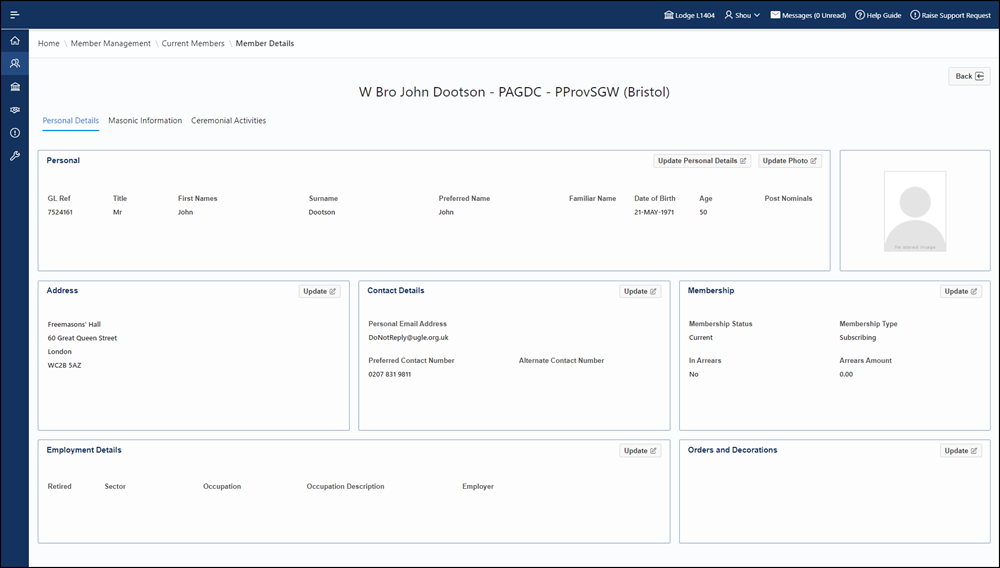
Step 2: Click the 'Update' button within the 'Orders and Decorations' region of the 'Personal Details' tab
Step 3: Click 'Add' to add a new Decoration
Step 4: Select the Decoration from the available options. You can search for a decoration either by entering the full name (e.g. Officer of the Order of the British Empire) or by the abbreviation (OBE).
Step 5: Specify what date the Decoration was ‘Awarded On’
Step 6: Click 'Save'
Step 7: Upon reading the confirmation message, click 'OK' to confirm the change
Additional Information
• Decorations can only be added and not removed. Please ensure accuracy when entering Orders and Decorations.
• When a Decoration is recorded against a member, it is validated by the Masonic Services Department at UGLE.
• When adding a Decoration that is a higher ranking award than a previously entered Decoration, the lower ranking award will no longer be displayed. For example, if a member has an MBE and an OBE is added to their record, only the OBE will be displayed.